

When something inside a business becomes inefficient, technology is often the first place people look for a solution.
The sales team is struggling to keep track of leads, so the company starts shopping for another CRM. Customers keep calling for updates, so someone suggests a customer service platform. Employees are spending too much time on administrative work, so management begins researching AI tools. Information is scattered across spreadsheets, email accounts, shared drives, and different applications, so another piece of software gets added to the stack.
Sometimes new software really is the answer.
But sometimes the software isn’t the problem.
The real problem is the process surrounding it.
A business can have excellent software and still operate inefficiently if information has to be manually moved between systems, employees don’t know what happens next, customers can’t see the information they need, or important decisions depend on someone remembering to send an email.
Adding another application to that environment may not solve the underlying problem. It can simply create another login, another subscription, another database, and another place employees have to check.
At Santoli Connected Network, we approach technology from a different direction. Instead of starting with the question, “What software should this business buy?” we start by asking:
“What is happening inside the business that is unnecessarily difficult?”
The answer can reveal whether the company actually needs new software—or whether it needs a better system connecting the people, information, processes, and technology it already has.
Here are seven signs your business may have a process problem rather than simply a software problem.
1. Employees Are Constantly Copying Information Between Systems
One of the easiest warning signs to identify is repetitive data entry.
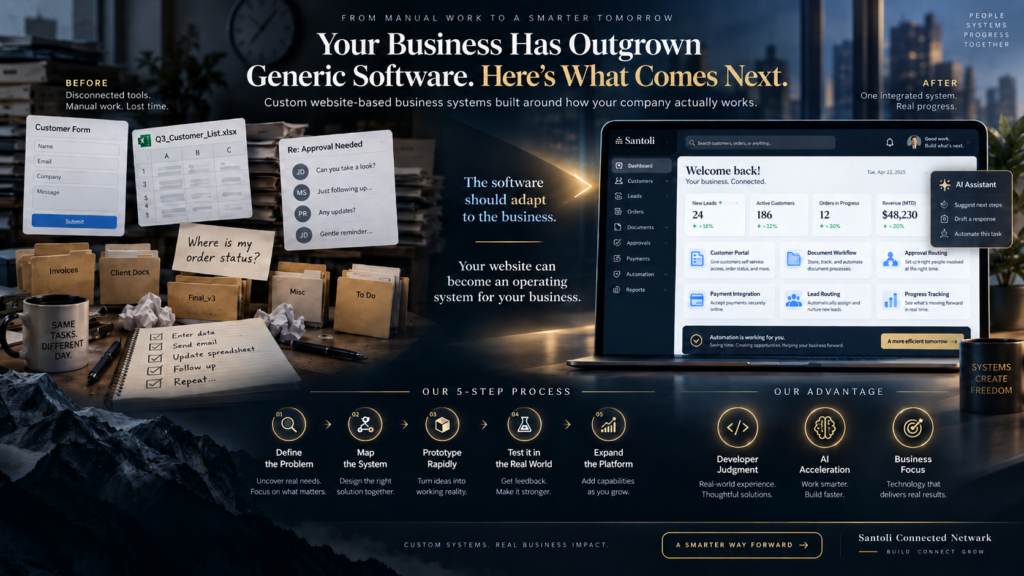
Imagine a potential customer completes a form on your website. Someone receives an email notification, copies the customer’s information into a spreadsheet, creates the customer inside a CRM, adds the project to another system, creates a folder for documents, and then sends an internal message telling someone else that the new customer has arrived.
Every individual step may seem small.
The problem becomes visible when you multiply those steps by every lead, customer, transaction, project, or employee.
If the same information is repeatedly being copied from one place to another, the business probably doesn’t need employees to become faster at copying information. It needs the systems involved in the process to communicate more effectively.
A properly designed business system might allow the customer to submit information once and then automatically make that information available wherever it is needed.
The website could create or update the appropriate customer record. A project could automatically enter the correct workflow. The responsible employee could receive a notification. Required documents could be associated with the customer. A dashboard could immediately show the new opportunity.
Instead of asking employees to become the integration between your software, the technology itself becomes the integration.
That distinction becomes increasingly important as a business grows.
2. Your Business Runs Through Spreadsheets and Email
Spreadsheets are incredibly useful.
Email is indispensable.
Neither was designed to become the operating system for an entire company.
Yet many businesses gradually reach that point without realizing it.
A spreadsheet that originally tracked ten customers eventually tracks hundreds. Another spreadsheet handles projects. Another tracks payments. Someone creates a shared spreadsheet for inventory. Another employee maintains a separate list because the original spreadsheet doesn’t contain the information their department needs.
Meanwhile, approvals happen through email.
A manager receives a request, responds with approval, forwards it to someone else, and assumes the next step will happen.
Eventually someone asks:
“What’s the status of this?”
Then the search begins.
Employees check inboxes, spreadsheets, folders, chat messages, and software systems trying to reconstruct what happened.
The individual tools aren’t necessarily failing. The process connecting them is failing.
A better business system can establish a defined workflow where information moves through stages, responsibilities are clear, actions are recorded, and everyone who needs visibility can see the current status.
The spreadsheet may still exist. Email may still be part of the process. The difference is that neither has to carry responsibilities it was never designed to handle.
3. Customers Have to Call or Email to Find Out What’s Happening
Consider how often your customers contact your company simply because they need information you already have.
“Did you receive my documents?”
“Has my application been reviewed?”
“What’s the status of my project?”
“Has my payment been received?”
“Who is handling my request?”
“What happens next?”
Every one of those questions creates work for your team.
An employee has to receive the message, identify the customer, locate the information, determine the current status, respond, and potentially follow up internally.
There are situations where customers absolutely should speak with a person. Good technology shouldn’t eliminate meaningful human interaction.
But there is a major difference between customer service and making customers contact your employees simply to retrieve basic information.
A customer portal, status dashboard, automated notification system, or secure account area can give customers visibility without requiring an employee to manually provide every update.
That can improve the customer experience while simultaneously reducing administrative work.
Your website then stops being just the place where customers discover your company.
It becomes part of the infrastructure through which they actually do business with your company.
4. Employees Have Created Their Own Workarounds
One of the most revealing questions you can ask employees is:
“What do you do when the system doesn’t let you do what you need to do?”
The answers can tell you more about your technology than a list of every application the company uses.
Employees are remarkably good at creating workarounds.
They build personal spreadsheets. They maintain handwritten notes. They create email folders. They save documents to their desktops. They send themselves reminders. They create unofficial procedures that aren’t documented anywhere.
These solutions aren’t necessarily signs that employees are doing something wrong.
Often, they’re signs that employees are trying to compensate for a process that doesn’t match how the business actually operates.
The workaround solves today’s problem.
Then another employee develops a different workaround.
Eventually, the company has several unofficial systems operating alongside the official one.
This creates risk because important business knowledge can become dependent on individual employees rather than being built into the organization’s systems.
If someone leaves, goes on vacation, or simply forgets a step, the process can break.
Before purchasing another application, it may be worth documenting these workarounds.
They often reveal exactly where a better workflow, automation, integration, or custom business system could have the greatest impact.
5. Growth Is Making the Business Less Efficient Instead of More Efficient
A process can work perfectly well when a company has five employees and become a serious problem when it has twenty.
That doesn’t necessarily mean anyone designed the original process poorly.
The business simply outgrew it.
When transaction volume is low, manual processes are often manageable. Employees know what everyone else is working on. A manager can remember the important customers. A shared spreadsheet can provide enough visibility. Someone can manually send the necessary follow-up emails.
Growth changes the mathematics.
If one transaction requires ten minutes of administrative work, ten transactions require 100 minutes.
At one hundred transactions, that same process requires more than sixteen hours.
Businesses sometimes respond by hiring additional people to manage the administrative workload.
Hiring may be appropriate, but there is another question worth asking first:
Is the company hiring people to perform work that technology could eliminate or dramatically reduce?
That is where process analysis becomes especially valuable.
Automation doesn’t have to mean replacing employees. Often, the better opportunity is removing repetitive administrative work so employees can spend more time selling, serving customers, making decisions, solving problems, and performing the work that actually requires human judgment.
Growth should create leverage.
If every increase in revenue requires an almost identical increase in administrative effort, the underlying systems may need to evolve.
6. You Have Plenty of Software, but Nothing Really Works Together
Modern businesses have access to an extraordinary number of applications.
CRM platforms.
Accounting software.
Project management tools.
Email marketing platforms.
Scheduling systems.
Customer service software.
Document storage.
WordPress plugins.
Automation platforms.
AI tools.
Each product may work extremely well on its own.
The problem appears in the space between them.
Your website collects information that doesn’t reach your CRM.
Your CRM contains information your customer portal can’t see.
Your accounting software knows a customer paid, but your internal workflow doesn’t automatically advance.
Your project management platform knows a project is complete, but someone still has to manually notify the customer.
Employees end up bridging those gaps themselves.
This is why adding another application can sometimes make the problem worse.
The business doesn’t necessarily need another isolated tool.
It may need an integration layer, custom workflow, or central business system that allows the existing tools to work together.
In some cases, that system can be built around technology the company already owns.
In others, a custom WordPress application, API integration, automation layer, internal dashboard, or purpose-built portal may make more sense.
The goal isn’t to use as much technology as possible.
The goal is to create a system where the technology serves the process.
7. Everyone Knows the Process, but Nobody Can Actually Explain It
This is one of the most important warning signs.
Ask three employees how a particular business process works and listen carefully to the answers.
You may hear:
“Usually I send it to Sarah.”
“After accounting approves it, I think operations gets it.”
“It depends on the customer.”
“John normally handles that.”
“I have a spreadsheet for it.”
“We just email each other.”
“If it’s urgent, I send a text.”
None of those answers necessarily indicates a bad employee.
They indicate that the process exists primarily inside people’s heads.
That makes the organization dependent on tribal knowledge.
As the company grows, that becomes increasingly difficult to manage. New employees take longer to train. Mistakes become harder to diagnose. Managers struggle to understand where bottlenecks occur. Customers receive inconsistent experiences.
Technology can help, but only after the workflow is understood.
Before automating a process, you need to know what the process actually is.
Who initiates it?
What information is required?
Who needs access?
What decisions occur?
What happens after each decision?
What exceptions exist?
Where are documents stored?
What does the customer need to see?
When should someone receive a notification?
What defines completion?
Once those questions are answered, technology can reinforce the process instead of forcing employees to invent one around the software.
The Answer Isn’t Always More Software
There is an understandable temptation to solve every operational problem by purchasing another tool.
Sometimes that’s exactly the right decision.
A well-designed commercial platform can be dramatically less expensive and more practical than building something custom.
But the decision should come after understanding the problem, not before.
The question shouldn’t be:
“What software should we buy?”
It should be:
“What are we trying to make easier, faster, more reliable, or more scalable?”
Once that question is answered, the appropriate technology becomes much easier to identify.
Sometimes the answer will be an existing application.
Sometimes it will be connecting applications the company already uses.
Sometimes it will be automating a repetitive workflow.
Sometimes it will be improving an existing WordPress website so that it becomes part of the company’s operational infrastructure.
And sometimes the business really does need a custom system designed around a process that off-the-shelf software doesn’t handle particularly well.
Your Website Can Become Part of the Business System
For many businesses, the website remains disconnected from almost everything that happens after a customer clicks Submit.
That’s a missed opportunity.
WordPress can be much more than a content management system for pages and blog posts.
Depending on the business, a website can become the front end of a larger operational system that includes customer accounts, onboarding, document management, project intake, status tracking, dashboards, payments, workflow automation, CRM integrations, notifications, AI-assisted processes, and internal administrative tools.
That doesn’t mean every business should build a massive custom application.
It means businesses should stop assuming the website and the business operation have to be two completely separate things.
The right system might be surprisingly small.
Automating one repetitive process, connecting two disconnected applications, or giving customers visibility into one frequently requested status can sometimes create more value than redesigning an entire website.
Start With the Friction
At Santoli Connected Network, our approach begins with friction rather than technology.
Where is the business losing time?
What are employees repeatedly doing manually?
Where is information being copied?
What are customers constantly asking about?
Which processes become difficult as volume increases?
Where are employees creating their own workarounds?
Which systems contain information that another system needs?
Those questions help identify whether the problem is really the software—or the process surrounding it.
From there, the solution might involve web development, WordPress development, workflow automation, AI automation, system integrations, a customer portal, an internal dashboard, or a completely custom business system.
But we don’t need to decide that before understanding the problem.
The business problem comes first. The technology comes second.
Find Out Where Your Business Is Losing Time
If some of the situations in this article sound familiar, you don’t necessarily need to start shopping for another software subscription.
Start by identifying the friction.
Santoli Connected Network’s Business Systems Audit is designed to help businesses examine their current processes, repetitive work, disconnected systems, customer experience, and opportunities for automation.
The goal isn’t to sell you software you don’t need.
It’s to identify where technology could make the way your business already works simpler, faster, and more scalable.
Take the Santoli Business Systems Audit and discover where your current processes may be creating unnecessary work.